Build macOS projects with AppVeyor
Posted on November 20, 2019
Today we are adding macOS to our hosted CI/CD environment. Now you can consolidate all your multi-platform projects and run Windows, Linux and macOS builds with AppVeyor.
As with our Windows and Linux environments, we are committed to provide you with the most recent software and complete toolset for macOS. You can choose from two macOS images:
macos- macOS 10.15 “Catalina”macos-mojave- macOS 10.14 “Mojave”
Both images have the latest XCode 11.2.1 pre-installed, all the latest versions of Node.js, Go, Java, .NET Core, Ruby, Python and compilers. You can find the full list of pre-installed software on this page.
macOS builds are available to everyone by request - send us an email.
Best regards,
AppVeyor team
Visual Studio 2019 image with Docker and LCOW, WSL, Qt and pre-heated VMs
Posted on October 11, 2019
The latest Visual Studio 2019 image update added a lot of new exciting stuff you were missing in your builds:
- Docker EE with Linux Containers on Windows (LCOW) support
- Windows Subsystem for Linux (WSL)
- Qt framework
Not only we updated the image, but we moved it to our fast Hyper-V environment with pre-heated VMs and now it will take seconds for new builds to start! All Visual Studio 2019 build VMs have nested virtualization enabled.
Docker with Linux containers support
Docker on Visual Studio 2019 image allows you to run Windows and Linux containers simultaneously without ever switching between Windows and Linux “modes”. Running a Linux container could be as simple as docker run --rm busybox echo hello_world.
Windows Subsystem for Linux (WSL)
There is WSL installed on Visual Studio 2019 image with the following Linux distributions:
- Ubuntu-18.04 (Default)
- Ubuntu-16.04
- openSUSE-42
You can run Linux commands inside WSL with a simple wsl <command> and you can switch between distributions with wslconfig.
Qt framework
Now you can build and test your Qt applications on Visual Studio 2019 image. The following Qt releases installed:
- Qt 5.13.1
- Qt 5.12.5
- Qt 5.9.8
And we have automated the installation of Qt with Packer, so you can use it with AppVeyor Bring-Your-Own-Cloud solution!
Give this new image a try and let us know if you have any questions or suggestions!
Phasing out “Windows Server 2019” image
If you are using Windows Server 2019 please switch to Visual Studio 2019 image as we are not going to evolve/update Windows Server 2019 image going forward.
Linux images on pre-heated VMs
With the increased demand for Linux builds we have moved Ubuntu, Ubuntu1804 and Ubuntu1604 images to Hyper-V environment with pre-heated VMs, so Linux builds start in seconds now!
Best regards,
AppVeyor team
Self-hosted jobs on your computer or in cloud VMs
Posted on October 01, 2019
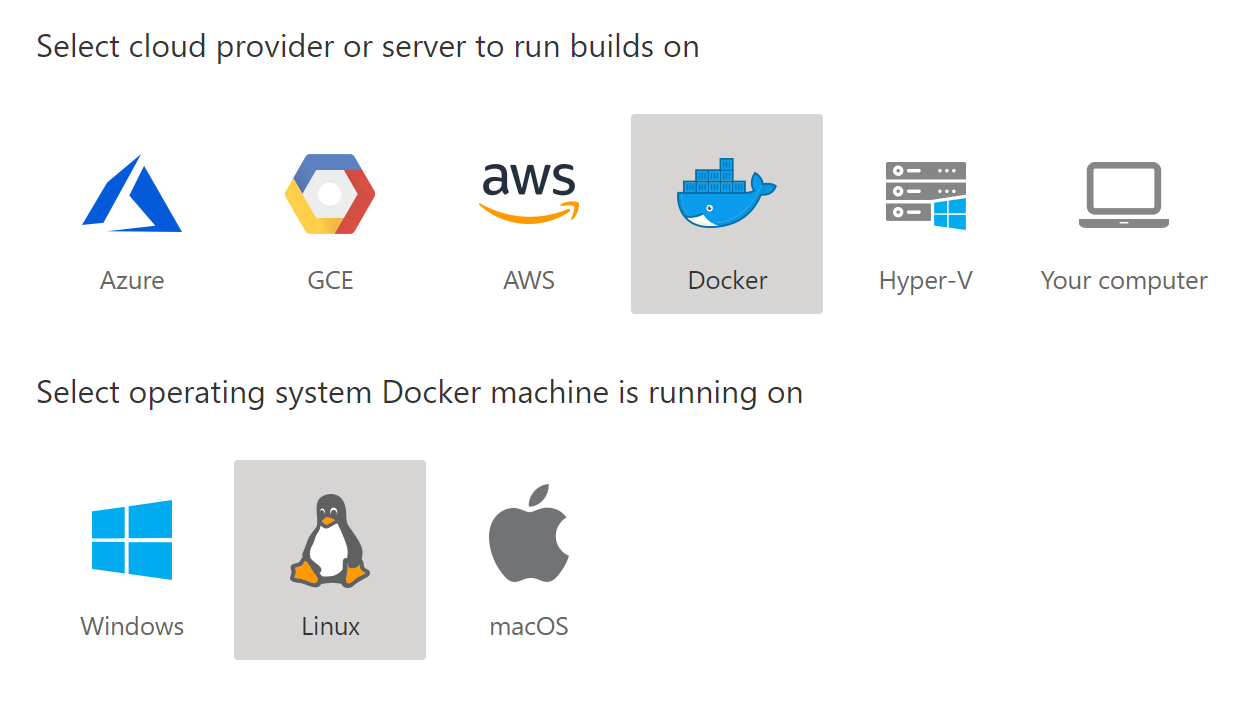
The new Bring Your Own Cloud (BYOC) feature enables you to run builds on your own infrastructure. Builds could be run inside VMs (Azure, AWS, GCE, Hyper-V), in Docker containers (Windows, Linux and macOS) or directly on the host (Windows, Linux and macOS). BYOC is available for hosted AppVeyor accounts and self-hosted AppVeyor Server installations.
Use cases
- Local testing - connect your Windows or Mac development machine to AppVeyor and run build/tests there.
- Custom build images - build your own custom build VM images optimized for your needs. Read more.
- Custom VM sizes/types - use servers or VMs with better/different characteristics (GPU-enabled, memory-, disk-, network-optimized).
- Per-minute pricing - Build VM is created for the duration of a build job and immediately deleted when this build is over. AWS, GCE and Azure have per-minute pricing so you pay for the “clean” build time only.
- Security/compliance requirements - the code or build artifacts not leaving particular cloud/region/zone/network.
Advantages
While AppVeyor BYOC supports running builds on a host directly (aka “self-hosted agent”) it really shines at running builds on dynamically provisioned VMs. Creating VMs on demand has a number of advantages:
- Significant savings on a monthly cloud bill - build VM is created for the duration of a build job and you pay for “clean” build time. “Self-hosted agent” is installed on VM running 24x7 and waiting for your builds.
- Pristine environment for every build - build VMs are provisioned from an image and never reused for the consequent builds. You get pristine environment for every build. “Self-hosted agent” runs builds directly on the host operating system thus pulluting it with leftovers.
- Multiple parallelism. A single build can be run on hundreds of VMs simoultanously for a shorter period of time. For example, you have a suite with 1,000 tests and it takes 1 hour on a single core to run them all. You can run the suite on 10 single-core VMs in parallel and reduce the overall test time to 6 minutes by paying the same amount to the cloud provider!
Included in all accounts for free
We are excited to announce that we’ve enabled BYOC for all open-source and paid accounts and added 5 self-hosted jobs free of charge. Now you can run up to 5 self-hosted jobs simultaneously on your own computer or in your cloud VMs.
Please note that charges for cloud VMs and other cloud resources will be applied directly to your cloud account bill.
Getting started
To configure your own build environment select Self-hosted jobs in the top menu and click Add cloud. There is a wizard that will guide you through the process and give you commands based on your selection that should be run on your computer.
Read more about BYOC in our docs. Give it a try and let us know what you think!
Best regards,
AppVeyor team
Gitea receives first-class support in AppVeyor CI
Posted on September 05, 2019
Gitea is a fantastic self-hosted Git service! It’s free, open-source, very lightweight (a single file to download and run on any platform), feature-rich and has an extensive GitHub-like API. AppVeyor Server is a self-hosted CI/CD service which is also free, multi-platform and lightweight (absolutely no dependencies) - it’s a perfect CI/CD companion for your Gitea installation!
Until today, developers have been adding Gitea repositories in AppVeyor as “generic” Git projects thus missing essential CI/CD conveniences such as automatic builds triggering, private repositories, appveyor.yml support, commit statuses and pull request builds.
Today we are thrilled to announce Gitea to extend AppVeyor family of built-in source control providers!
Gitea integration highlights
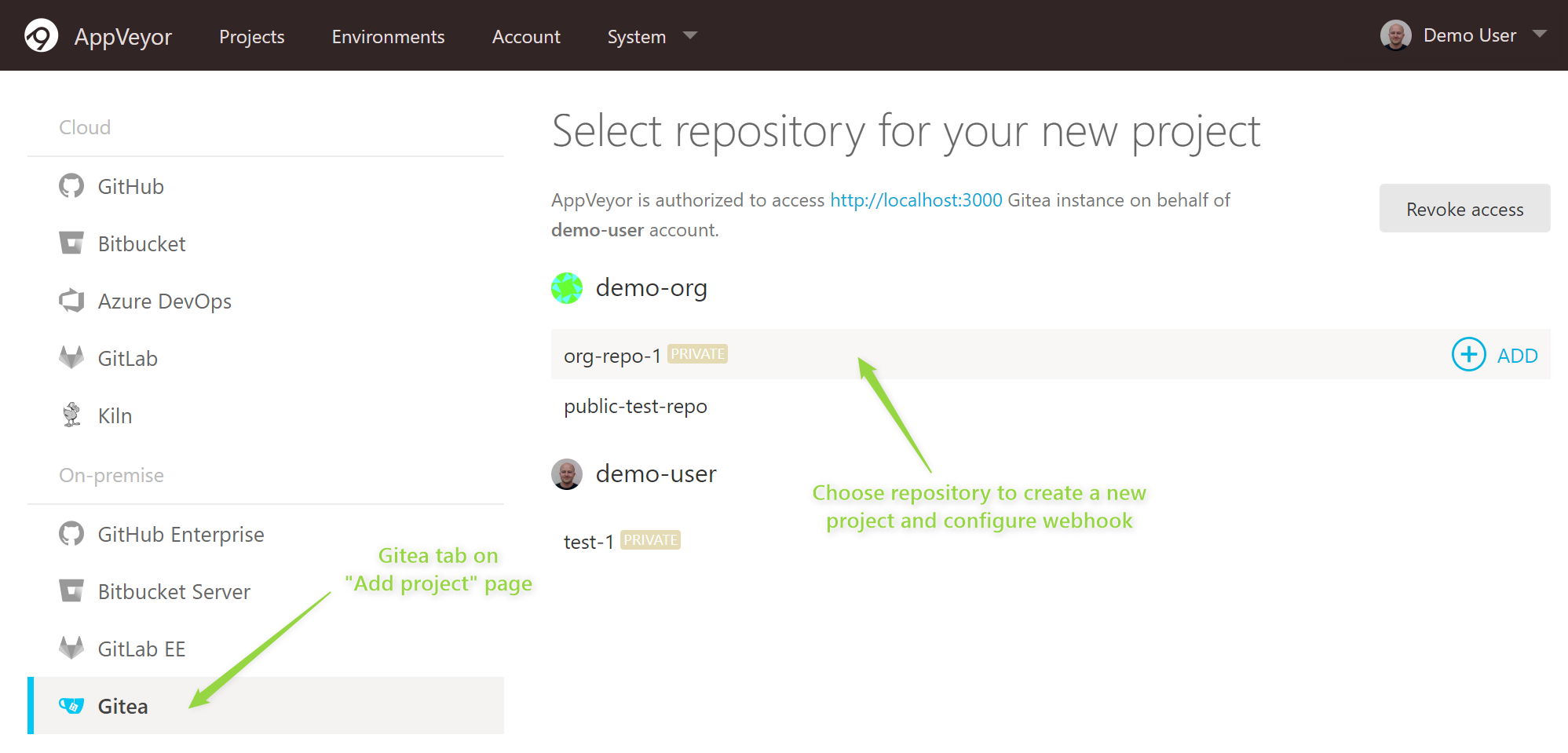
- Pick Gitea repository for a new project.
- Repository webhook is configured for you to automatically trigger builds on code pushes and pull requests.
- Configure your builds with
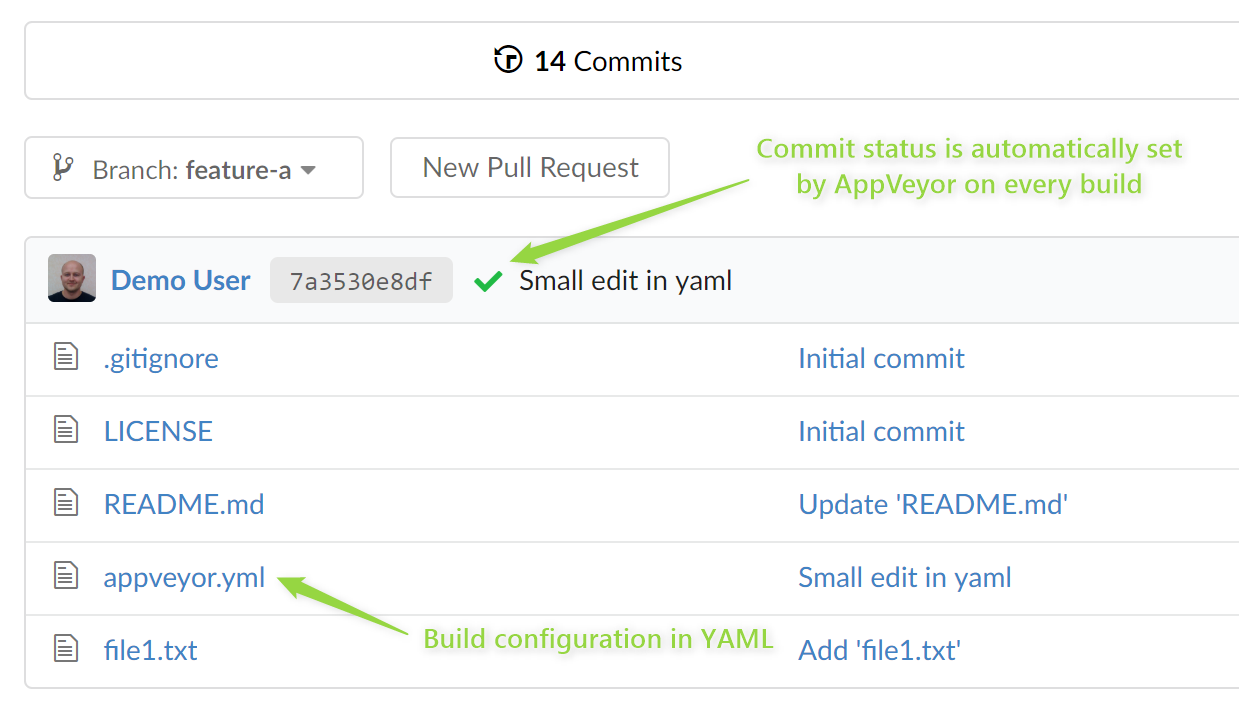
appveyor.ymlin the root of the repo. You can still configure on web UI too. - Commit statuses for branch and PR builds with links to corresponding AppVeyor builds.
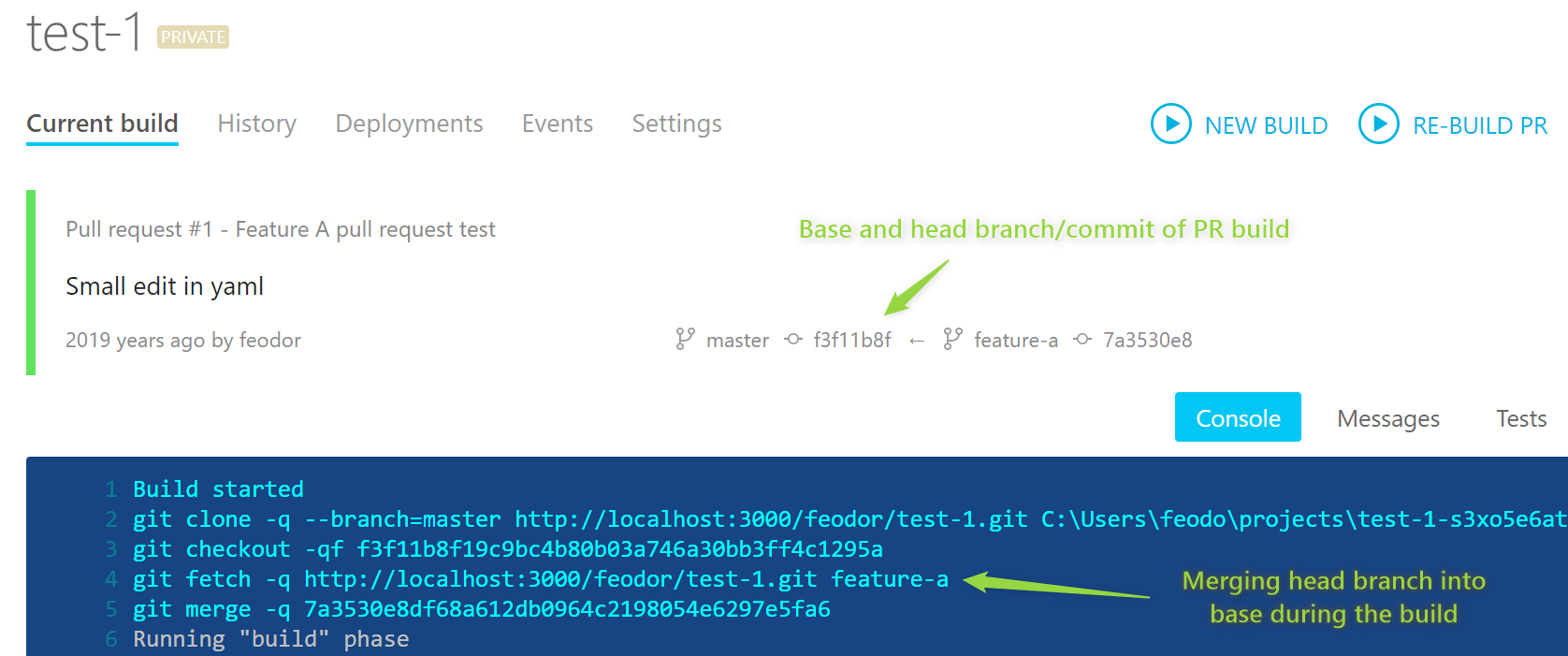
- GitHub-like testing of pull requests by automatic merging of head into base on the clone.
Lightweight and easy-to-configure AppVeyor is a perfect CI/CD match for your Gitea installation.
Install AppVeyor on your favorite platform, connect to Gitea and enjoy your builds!
Best regards,
AppVeyor team
AppVeyor Server for Mac
Posted on August 02, 2019
Since AppVeyor Server release in May we’ve received great feedback and recognized huge demand for AppVeyor for Mac.
Today we are proud to announce the availability of AppVeyor Server (on-premise) for Mac, free for unlimited projects, builds, clouds and agents. This officially makes AppVeyor the only CI/CD solution that offers both hosted service and multi-platform on-premise installation.
AppVeyor Server for Mac enables to run CI/CD workflows on macOS directly or inside Docker containers. It can be installed on your own Mac or a Mac hosted in a cloud (like MacStadium or macincloud) as a build server for your entire team. When installed on cloud-hosted Mac you can also run Windows and Linux builds on Azure, GCP or AWS.
Installation and getting started
AppVeyor Server for Mac can be installed in seconds with Homebrew:
brew tap appveyor/brew
brew install appveyor-server
brew services start appveyor-server
Once AppVeyor service is started open http://localhost:8050 in your browser to continue with AppVeyor setup.
Follow this guide to get your builds up and running on your Mac.
Install AppVeyor Server for Mac today and let us know what you think!
What’s next
A new Bring Your Own Cloud (BYOC) feature is coming soon which will allow you connecting Mac to a hosted AppVeyor account or AppVeyor Server running on any platform. Imagine AppVeyor Server running on cheap $10 DigitalOcean Linux VM and running builds on your team Macs or Windows VMs provisioned on-demand on Azure!
We are also working on adding support for Parallels Desktop, VMWare Fusion and VirtualBox on Mac, so you’ll be able to safely test against various configurations (different macOS releases, XCode versions, etc.) in virtualized environments.
Best regards,
AppVeyor team